NumPy Toolbox
EE1021 Programming for Engineers - Lecture 11
Basri Erdogan
Lecture Goals
- Explain what NumPy is and how its fixed-size, homogeneous arrays differ from Python lists
- Create arrays with
np.array,arange,linspace,zeros,ones,eye,meshgrid, andnp.random - Inspect array attributes (
ndim,shape,dtype) and change layout withreshapeand.T - Select data with indexing and slicing, including logical (boolean) and fancy indexing
- Compute with elementwise arithmetic, comparisons, reductions (
sum,min,mean), sorting, and stacking - Use arrays as matrices:
@matrix product andnp.linalg(solve,inv,det,matrix_rank)
Last Time
- File input/output
- Opening, reading, and writing text files
- The
withstatement - CSV files and the
csvmodule
Today
- The NumPy module
- Arrays: creation, attributes, reshaping
- Indexing and slicing
- Elementwise operations and reductions
- Matrices and linear algebra
Part 1: What Is NumPy?
NumPy
- NumPy is the fundamental package for scientific computing in Python.
- It is a Python library that provides:
- A multidimensional array object
- Various derived objects, such as masked arrays and matrices
- Routines for fast operations on arrays
- mathematical, logical, shape manipulation, sorting, selecting, I/O, discrete Fourier transforms, basic linear algebra, basic statistics, random simulation, and much more
- Official site and documentation: https://numpy.org/
NumPy Arrays vs. Python Lists
- NumPy arrays have a fixed size at creation, unlike Python lists (which can grow dynamically).
- The elements are all required to be of the same data type, and thus the same size in memory (exception:
objectarrays). - NumPy arrays enable advanced mathematical operations on large amounts of data with less code.
- Most of today’s scientific and mathematical Python software builds on NumPy arrays.
Vectorization and Broadcasting
- Vectorization: no explicit loops or indexing in your code — the looping happens behind the scenes in optimized, pre-compiled C code.
- Vectorized code is more concise and easier to read
- Fewer lines of code generally means fewer bugs
- The code closely resembles standard mathematical notation
- Broadcasting: operations act element by element implicitly — not just arithmetic, but logical, bit-wise, and functional operations too.
- Works between arrays of the same shape, a scalar and an array, or even arrays of different shapes, provided the smaller one is “expandable” to the larger shape unambiguously.
Using a Function from a Module (Recap)
- Method 1 — import all and use the name:
from moduleX import *thenfunction_name(...)
- Method 2 — dot notation:
import moduleXthenmoduleX.function_name(...)
- Method 3 — alias and dot notation:
import moduleX as mnthenmn.function_name(...)
- Method 4 — import only the function itself:
from moduleX import function_namethenfunction_name(...)
Importing NumPy
By convention, NumPy is imported with the alias np:
Part 2: Creating Arrays
NumPy’s Main Object Is the Array
- NumPy’s main object is the homogeneous multidimensional array (
ndarray). - Homogeneous: all elements have the same type.
- In NumPy, dimensions are called axes; the number of axes is the rank.
- A vector is an array of rank 1
- A 2-D matrix is an array of rank 2
The Array Object — Creation
>>> import numpy as np
>>> a = np.array([0, 1, 2])                  # 1-d array
>>> a
array([0, 1, 2])
>>> b = np.array([[0, 1, 2], [3, 4, 5]])     # 2 x 3 array
>>> b
array([[0, 1, 2],
[3, 4, 5]])- Pass a list (or nested lists) to
np.array; the nesting depth sets the rank.
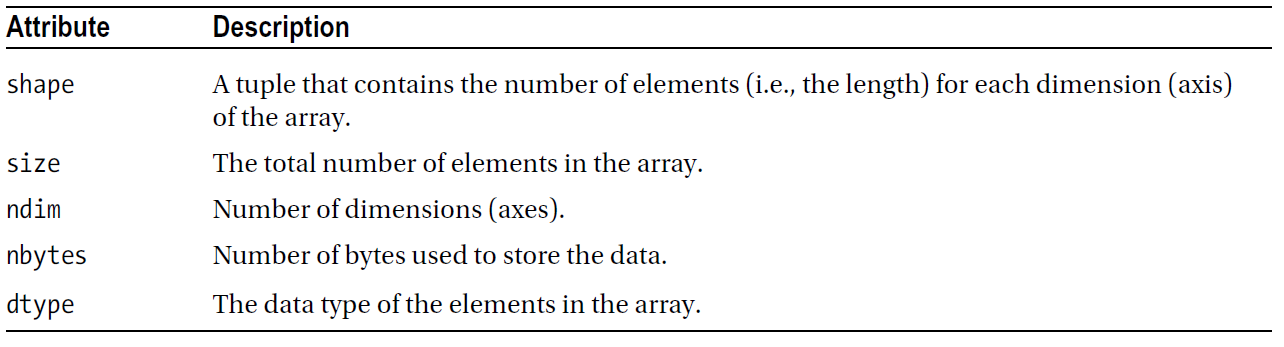
Array Attributes
Array Attributes
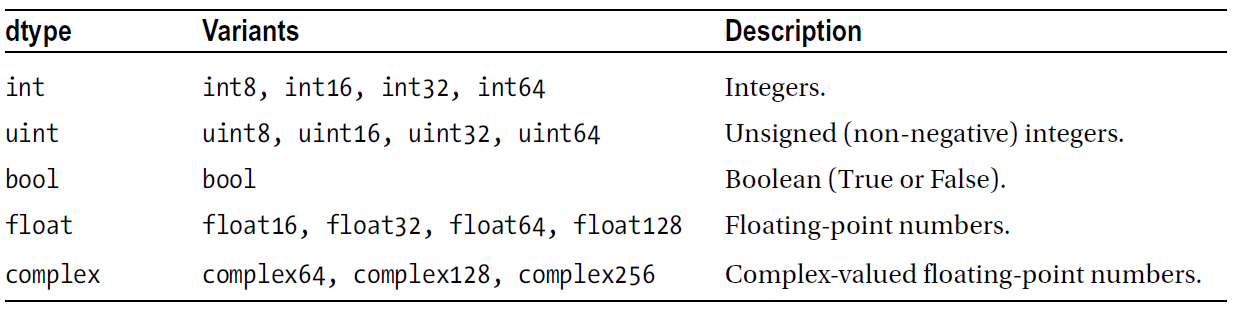
Arrays: Numerical Data Types
- Remember: NumPy arrays are homogeneous!
Creating an Array of a Specific Type
>>> a = np.array(range(10), float)
>>> a
array([ 0., 1., 2., 3., 4., 5., 6., 7., 8., 9.])
>>> a.dtype
dtype('float64')- The second argument (or the
dtype=keyword) sets the element type.
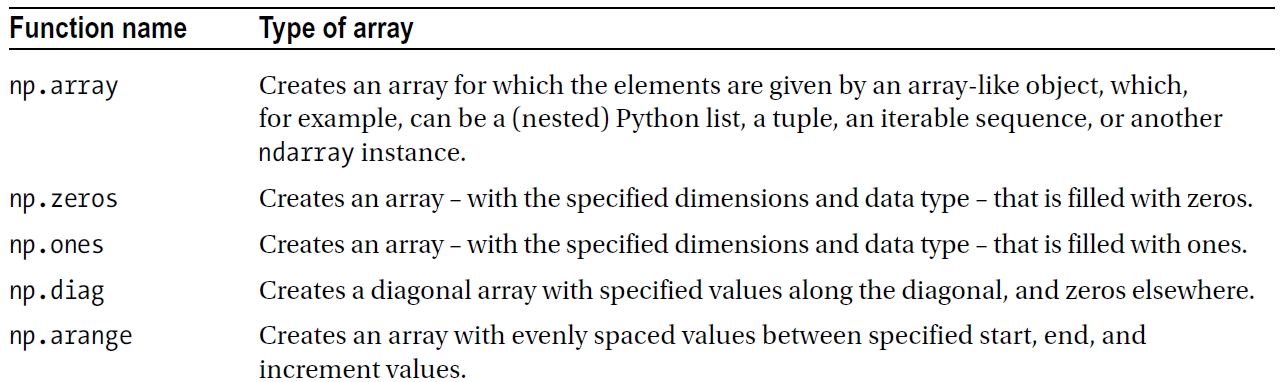
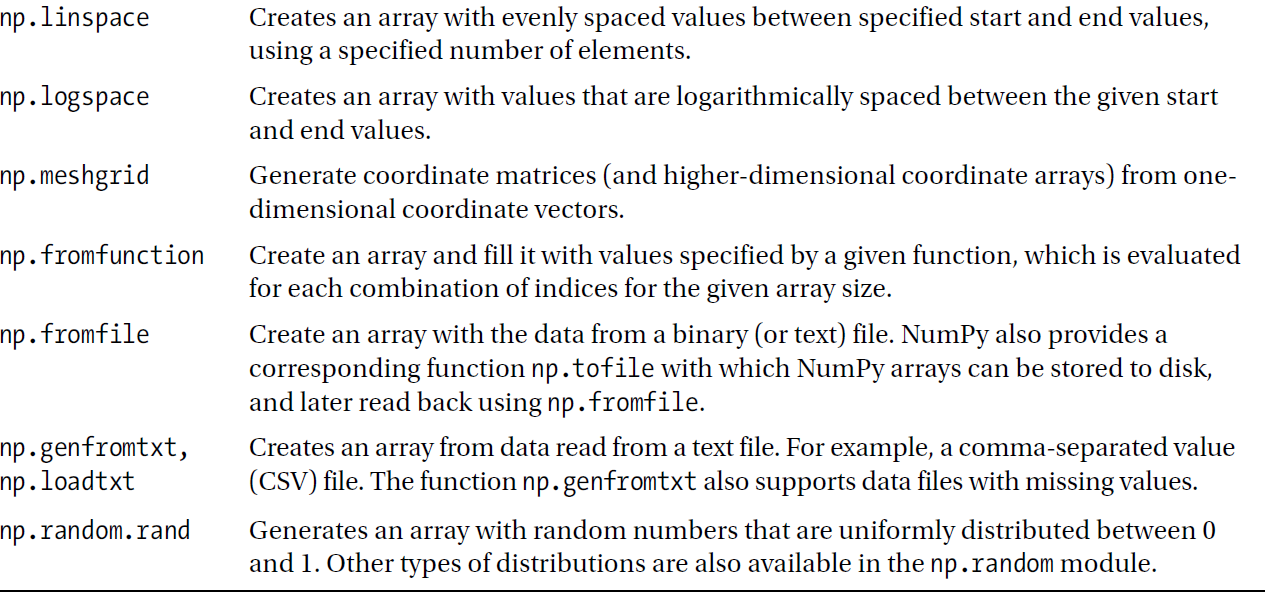
Creating Arrays
Four general mechanisms for creating arrays:
- Conversion from other Python structures (e.g., lists, tuples)
- Intrinsic NumPy creation functions (e.g.,
arange,ones,zeros) - Reading arrays from disk, in standard or custom formats
- Special library functions (e.g.,
np.random)
Creating an Array of Zeros or Ones
>>> np.zeros(7, dtype=int)
array([0, 0, 0, 0, 0, 0, 0])
>>> np.ones((2, 3), dtype=float)
array([[ 1., 1., 1.],
[ 1., 1., 1.]])- Pass a shape tuple for multidimensional arrays.
Creating Arrays Containing Number Sequences
>>> np.arange(10)
array([0, 1, 2, 3, 4, 5, 6, 7, 8, 9])
>>> np.arange(2, 7)
array([2, 3, 4, 5, 6])
>>> np.arange(2, 7, 2)      # start, end (exclusive), step
array([2, 4, 6])- Like
rangein Python, but returns a NumPy array object.
Creating Arrays Containing Number Sequences
>>> print(np.arange(1, 5.5, 0.5))       # start, end (exclusive), step
[ 1.  1.5 2.  2.5 3.  3.5 4.  4.5 5. ]
>>> print(np.arange(1, 5.5, 0.5)[3:1:-1])   # slicing works like lists
[ 2.5 2. ]
>>> print(np.linspace(1, 5, 9))         # start, end, number of points
[ 1.  1.5 2.  2.5 3.  3.5 4.  4.5 5. ]
>>> print(np.random.rand(5))            # random values between 0 and 1
[ 0.53844313 0.3384871 0.5763536 0.29159273 0.43938366]- More creation routines: https://numpy.org/doc/stable/reference/routines.array-creation.html
Mesh-Grid Arrays
Mesh-Grid Arrays
- A common usage: evaluating a function over two variables
xandy— for example when plotting surfaces. - Example: calculate
z = (x + y)**2at all combinations ofxandy:
Creating Matrix Arrays
Reshaping an Array
>>> a = np.array(range(10), float)
>>> a
array([ 0., 1., 2., 3., 4., 5., 6., 7., 8., 9.])
>>> a = a.reshape((5, 2))
>>> a
array([[ 0., 1.],
       [ 2., 3.],
       [ 4., 5.],
       [ 6., 7.],
       [ 8., 9.]])
>>> a.shape
(5, 2)- The total number of elements must stay the same.
Part 3: Indexing and Slicing
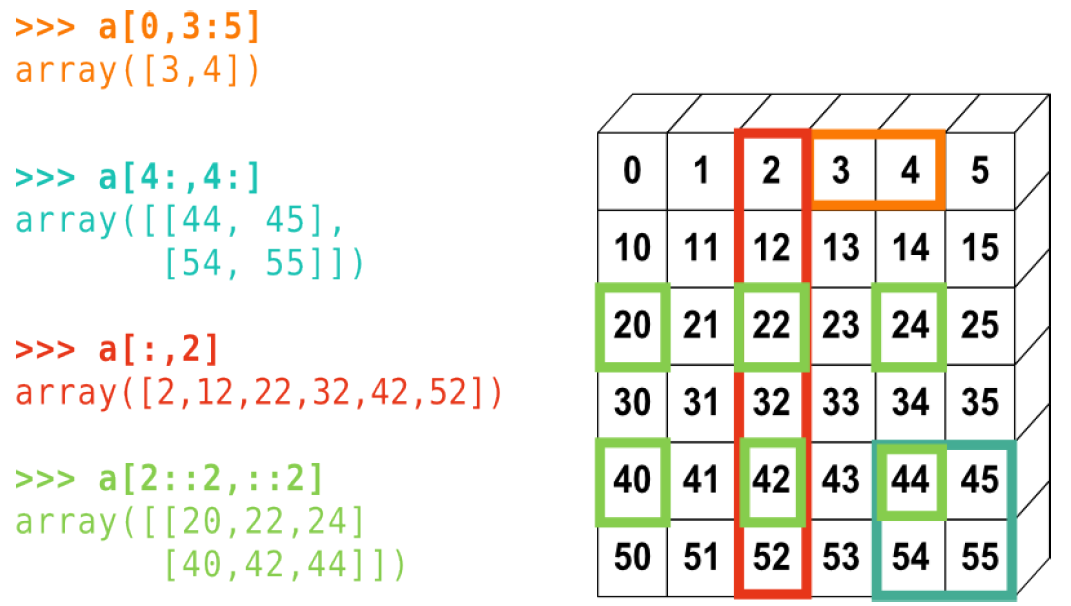
Indexing and Slicing: Similar to Lists
>>> a = np.diag(np.arange(3))
>>> a
array([[0, 0, 0],
       [0, 1, 0],
       [0, 0, 2]])
>>> a[1, 1]
1
>>> a[2, 1] = 0        # assignment works elementwise
>>> a[1]               # a[1, :] also works
array([0, 1, 0])
>>> a[:, 1]
array([0, 1, 0])
>>> a[2][1:]
array([0, 2])- Slicing: specify which rows/columns to take with
A[rows, columns].
Indexing and Slicing: Matrices
| 0 | 1 | 2 | 3 | 4 | 5 |
|---|---|---|---|---|---|
| 10 | 11 | 12 | 13 | 14 | 15 |
| 20 | 21 | 22 | 23 | 24 | 25 |
| 30 | 31 | 32 | 33 | 34 | 35 |
| 40 | 41 | 42 | 43 | 44 | 45 |
| 50 | 51 | 52 | 53 | 54 | 55 |
Logical Indexing
>>> a = np.random.randint(0, 21, 15)    # 15 ints in [0, 20]
>>> a
array([10, 3, 8, 0, 19, 10, 11, 9, 10, 6, 0, 20, 12, 7, 14])
>>> (a % 3 == 0)
array([False,  True, False,  True, False, False, False,  True,
False, True, True, False, True, False, False])- What will be the result?
- What will be the type of the new object?
Logical Indexing
Fancy Indexing
# Indexing with an array/list of integers
>>> a = np.arange(0, 100, 10)
>>> a[[2, 3, 2, 4, 2]]          # note: [2, 3, 2, 4, 2] is a Python list
array([20, 30, 20, 40, 20])- Indices may repeat and appear in any order.
Part 4: Operations on Arrays
Elementwise Operations
Array Arithmetic
Arithmetic operators on arrays apply elementwise. A new array is created and filled with the result.
>>> x = np.array([1, 5, 2])
>>> y = np.array([7, 4, 1])
>>> x + y
array([8, 9, 3])
>>> x * y     # elementwise! Use np.dot(x, y) or x @ y for the dot product.
array([ 7, 20, 2])
>>> x - y
array([-6, 1, 1])
>>> x // y
array([0, 1, 2])
>>> x % y
array([1, 1, 0])- Note that here
xandyhave the same size.
Comparisons and Boolean Operations
>>> a = np.random.randint(0, 11, 15)   # 15 ints in [0, 10]
>>> a
array([ 4, 9, 1, 7, 0, 9, 8, 10, 1, 0, 7, 7, 9, 5, 1])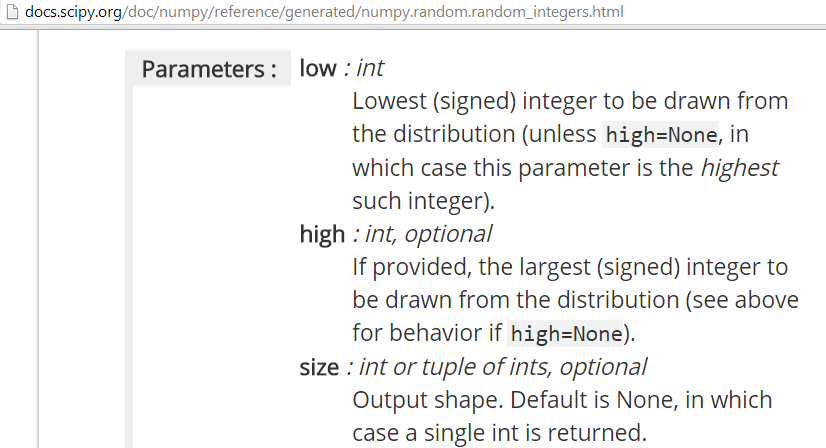
Comparisons and Boolean Operations
>>> a = np.random.randint(0, 11, 15)
>>> b = np.random.randint(0, 11, 15)
>>> comp1 = (a == b)
>>> comp1
array([False, False, False, False, False,  True, False, False,
       False, False, False, False, False, False, False])
>>> comp1.any()      # is any element True?
True
>>> comp1.all()      # are all elements True?
False
>>> comp1.nonzero()  # get the True indices
(array([5]),)
Reductions
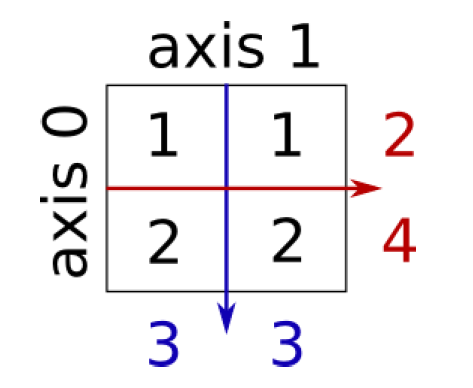
>>> x = np.array([[1, 1], [2, 2]])
>>> x
array([[1, 1],
       [2, 2]])
>>> x.sum()             # works on the entire matrix
6
>>> x.sum(axis=0)       # sum over the columns (first dimension)
array([3, 3])
>>> x[:, 0].sum(), x[:, 1].sum()
(3, 3)
>>> x.sum(axis=1)       # sum over the rows (second dimension)
array([2, 4])- Also works with
x.min,x.max,x.mean, etc.
Sorting Along an Axis
Array Stacking
Concatenate two arrays vertically (vstack) or horizontally (hstack):
Array Stacking
Part 5: Matrices and Linear Algebra
Matrix Basics (NumPy)
- A matrix is a 2-D NumPy array: shape
(m, n). - Transpose:
A.T— identity:np.eye(n). - Elementwise vs. matrix operations:
- Elementwise:
A * B(same shape) - Matrix multiply:
A @ Bornp.matmul(A, B)
- Elementwise:
- Shape rule for
@:(m x k) @ (k x n) -> (m x n)
Matrix Basics (NumPy)
Core Linear Algebra Operations
- Solve
Ax = b:np.linalg.solve(A, b)— prefer over formingA**-1 - Inverse (square, well-conditioned):
np.linalg.inv(A) - Determinant / rank:
np.linalg.det(A),np.linalg.matrix_rank(A) - Other:
np.linalg.norm(A),np.linalg.svd(A),np.linalg.eig(A)
Tip
For stability and speed, prefer solve over inverse-then-multiply.
Core Linear Algebra Operations
Summary
- NumPy arrays are homogeneous and fixed-size; vectorized operations replace explicit loops.
- Create arrays with
np.array,arange,linspace,zeros/ones,eye,meshgrid, andnp.random.randint/rand. - Inspect with
ndim,shape,dtype; reorganize withreshapeand.T. - Index like lists, plus logical masks and fancy indexing.
- Reductions (
sum,min,mean) take anaxisargument;sort,hstack,vstackreorganize data. - For matrices:
@for products andnp.linalgforsolve,inv,det,rank.