File Input/Output
EE1021 Programming for Engineers - Lecture 10
Basri Erdogan
Lecture Goals
- Explain how files are organized: paths, extensions, text vs binary content
- Open and close files with
open(filename, mode)and the modes'r','w','a','r+','b' - Read files with
read(),readline(),readlines(), and line-by-line iteration - Write to files with
write()and automate closing with thewithstatement - Parse text using
split(),strip(), andrstrip(), and process CSV files with thecsvmodule - Handle missing files with
try/exceptand work with binary files and portable paths
Part 1: Working with Files
Last Week / Today
Last week
- Object-oriented programming
Today
- File input/output
Files and Folders
- A computer file is a resource for storing information; a “digital” document.
- Files are organized in folders (= directories).
- Every file has an address (path) in the computer’s file system.
- Example:
C:\Desktop\ta5_code\test_file.txt
- Example:
- The file’s extension represents its content type (
txt,exe,mp3,avi,jpg). - Text files are composed of a sequence of characters.
- Binary files store a sequence of bytes representing any type of information (not necessarily encoding for characters).
Text Files
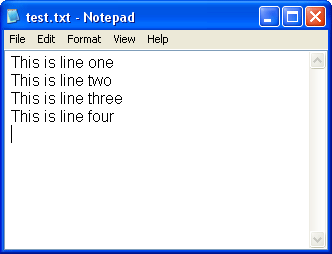
- Text files are composed of lines of text.
- Every line is composed of a sequence of characters.
- The last character on every line is the special ‘new line’ character (
'\n'), usually hidden by most text editors.
Opening a Connection to a File
open()returns a file object.- Most commonly used with two arguments:
open(filename, mode)filename: an address of a file.mode:'w'- write - overwrites (“deletes”) prior data'r'- read'a'- append - adds at end of prior data'r+'- opens the file to read and write'b'appended to the mode opens the file in binary mode
Reading a Whole File
>>> f = open('test_file.txt', 'r')  # returns a file object
>>> s = f.read()  # reads the entire file, returns its contents as a string
>>> print(s)
This is a file
>>> f.close()     # releases the file lock, frees resources
In case the file is located in a different directory, use the full path:
Reading Line by Line
The for loop is used to read line after line from a file object:
Functions for Reading from a File
f.read()- reads an entire file as a single stringf.readline()- reads the next line as a stringf.readlines()- reads all remaining lines as a list of strings- Iterating a file:
Remarks
- Reading advances the file position, so we cannot
read()twice from the same file, or loop twice (withfor) over the same file. - Remember to close the file using
f.close()to free up resources. - In a string,
'\n'represents the new line character:
Parsing a Text File - split
- Reading a text file means breaking every line into fields based on some predefined format.
- The
splitmethod splits a string into tokens using a delimiter, and returns a list of strings.
Ankara
Istanbul
Izmir
Bursa- If a delimiter is not specified, the string is split into words separated by a sequence of whitespaces.
Parsing a Text File - strip & rstrip
Use strip to remove unwanted characters from both sides of the string:
The string method rstrip() can be used to get rid of trailing newlines:
Part 2: Writing to Files
File Output: Writing to a File
Use f.write(str):
# open a file (or create it if no such file exists)
f = open('test_file_3.txt', 'w')
f.write("This is a test")

# newline
f.write('\n')

# to write a non-string object, first convert it to a string
tpl = ('string', 40)
f.write(str(tpl))

# flush data to the file and close it, unlock file, free resources
f.close()
Check the result:
The with Keyword
- The keyword
withallows us to automate the closing of a file. - Modify your code as follows:
- This implementation ensures the file is closed once the code inside the
withblock is executed.
Example: Writing a List of Numbers to a Text File
Part 3: CSV Files
CSV Files
- CSV stands for “comma separated values”.
- Let’s have a CSV file named
students.csvthat looks like:
Mert,Electronic
Ayse,Computer
Halil,Industrial
Hamit,Electronic- Create a new program:
The csv Module
- Standard library: Python includes a built-in module called
csvspecifically for reading and writing CSV files. - It is more robust than manually splitting strings with
line.split(','). - Handles complexity: it automatically handles edge cases, such as fields that contain commas (e.g.,
"Doe, John"), quotes, or newlines.
Converting CSV Content into Dictionaries
Dictionary implementation
Sorted version
import csv

students = []
with open("students.csv") as file:
    lines = csv.reader(file)
    for name, major in lines:
        students.append({"name": name,
                         "major": major})

def get_name(student):
    return student["name"]

for student in sorted(students, key=get_name):
    print(f"{student['name']} is in {student['major']}")
Lambda Expressions (Anonymous Functions)
- The expression below creates a function object:
- The unnamed object behaves like a function object defined with:
Sorting with a Lambda
import csv

students = []
with open("students.csv") as file:
    lines = csv.reader(file)
    for name, major in lines:
        students.append({"name": name, "major": major})

for student in sorted(students, key=lambda s: s["name"]):
    print(f"{student['name']} is in {student['major']}")
Output:
Ayse is in Computer
Halil is in Industrial
Hamit is in Electronic
Mert is in Electronic
Part 4: Robust File Handling
Handling File Errors
- The problem: what if the file you try to open doesn’t exist? The program will crash with a
FileNotFoundError. - The solution: use
tryandexceptblocks to handle errors gracefully. - Best practice: always anticipate potential issues when working with external files (missing files, permission issues).
Text vs. Binary Files
- Text files (
.txt,.csv,.py): store data as a sequence of characters. The computer encodes these characters (e.g., UTF-8, ASCII). - Binary files (
.dat,.jpg,.mp3,.exe): store data as a sequence of bytes (0s and 1s). There is no character encoding. - Why it matters: if you try to open an image in text mode (
'r'), Python will try to decode the bytes as text and crash or give garbage output. - Modes:
'rb': read binary'wb': write binary
Writing into a Binary File
When working with binary files, we read and write bytes objects, not strings.
# We want to generate a voltage ramp from 0V to 5V.
# In our 8-bit system, that means numbers from 0 to 255.

# Create a list of integers representing voltage levels.
# This represents one 'cycle' of a sawtooth wave.
signal_points = [0, 50, 100, 150, 200, 255, 0, 50, 100, 150, 200, 255]

# Convert the list of integers into raw bytes
binary_data = bytes(signal_points)
print(f"Signal ready: {list(binary_data)}")

# Save to a binary file ('wb') to simulate loading it into the device memory
with open("waveform.dat", "wb") as f:
    f.write(binary_data)

print("Waveform saved to waveform.dat")
Reading from a Binary File
Let’s write a script that reads the binary file and “plots” it to the screen using simple text bars.
# Read the raw binary data from the 'instrument'
with open("waveform.dat", "rb") as f:
    data = f.read()

print("--- REPLAYING SIGNAL ---")

# Iterate through every byte (voltage sample)
for sample in data:
    # 'sample' is automatically an integer (0-255)
    # Calculate real voltage (scale 0-255 to 0V-5V)
    real_voltage = (sample / 255) * 5.0
    # Create a simple visual bar graph
    bar_graph = "#" * (sample // 10)
    print(f"Data: {sample:3d} | Voltage: {real_voltage:.2f}V | {bar_graph}")
Absolute vs. Relative Paths
- Absolute path: the full, unique address of a file starting from the root of the drive.
- Analogy: a GPS coordinate (e.g., “41.0082 N, 28.9784 E”).
- Example:
C:\Users\Student\Project\data.txt(Windows) or/home/student/project/data.txt(Mac/Linux).
- Relative path: the path to a file relative to the script’s current location (current working directory).
- Analogy: directions from where you are standing (e.g., “go down the hall and take the second door”).
- Example:
data.txt(same folder) orfolder/data.txt(subfolder).
- Key takeaway: relative paths make your code portable. If you move your project folder to another computer, absolute paths will break, but relative paths will still work.
Absolute vs. Relative Paths: Example
import os

# Absolute path (hardcoded - avoid this!)
# This will crash if you move the script to another computer
abs_path = "C:/Users/Basri/Documents/Project/data.txt"

# Relative path (portable - preferred)
# Looks for 'data.txt' in the same folder as the script
rel_path = "data.txt"

print(f"Current Working Directory: {os.getcwd()}")

# Best practice: build paths dynamically.
# This works on Windows, Mac, and Linux automatically.
full_path = os.path.join(os.getcwd(), "data.txt")
Summary
open(filename, mode)returns a file object; modes'r','w','a','r+', and binary'b'control access.- Read with
read(),readline(),readlines(), or by iterating the file object line by line. - Write strings with
write(); convert non-string objects withstr()first. - The
withstatement closes files automatically - prefer it over manualclose(). - Parse lines with
split(), clean them withstrip()/rstrip(), and use thecsvmodule for real CSV data. - Wrap file access in
try/except FileNotFoundError, use binary modes for non-text data, and prefer relative paths for portability.