Plotting and Visualization

EE1021 Programming for Engineers - Lecture 9

Basri Erdogan

Lecture Goals

  1. Understand the structure of a matplotlib graphic: figure, axes, and line objects
  2. Create line plots and customize markers, colors, line widths, and line styles
  3. Make plots readable with titles, axis labels, legends, grids, and axis limits
  4. Choose the right axis scaling: linear, semilogx, semilogy, and loglog
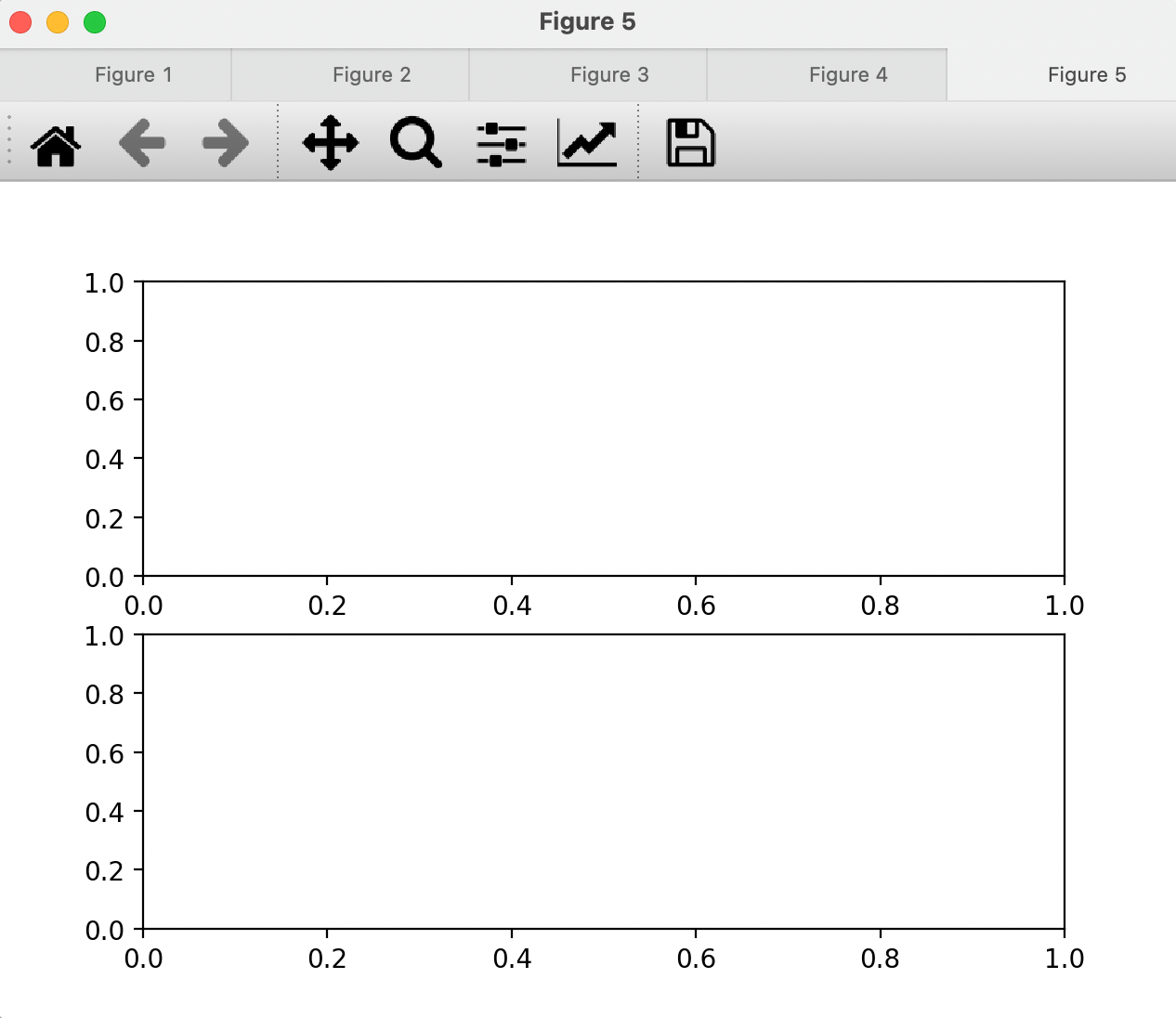
  5. Combine several plots in one figure with subplots
  6. Plot complex-valued and periodic data using polar plots

Part 1: First Plots with Matplotlib

Last Time / Today

Last time

  • NumPy arrays

Today: matplotlib.pyplot

  • Drawing graphs in Python with Matplotlib’s PyPlot module
  • Line graphs and their customization
  • Subplotting
  • Polar plots

Visualization

  • Visualization is a universal tool for investigating and communicating results of computational studies.
  • Knowledge and insights can be most easily gained from computational results when they are visualized.
  • There are a number of high-quality visualization libraries for Python.
  • The most popular one is Matplotlib.

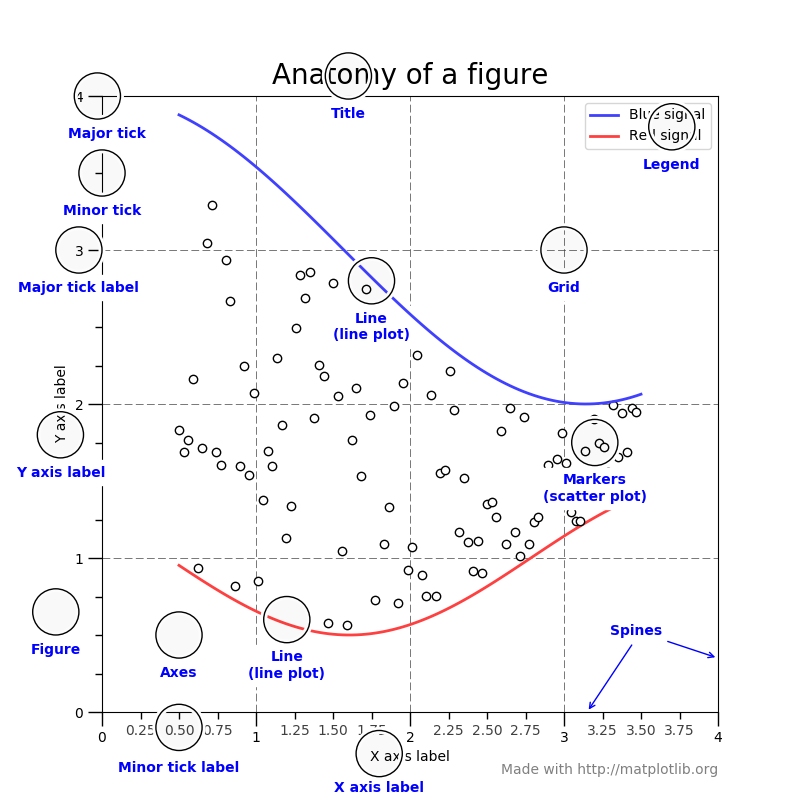
Anatomy of a Figure

Figure, Axes, and Line Objects

  • The Figure is the main instance of a graph window.
  • A figure may involve more than one Axes area.
    • The axis provides the coordinate system.
  • An axes area may involve more than one Line object.

First Plot

To draw a first plot, we:

  1. Generate an x array.
  2. Calculate the y array from x.
  3. Plot x versus y.

First Plot: Code

import numpy as np
import matplotlib.pyplot as plt

# generate x array
x = np.arange(-5, 4)

# calculate y from x
y = 5*x + 4

# create figure and axes objects
fig, axs = plt.subplots(1, 1)
lns, = axs.plot(x, y)

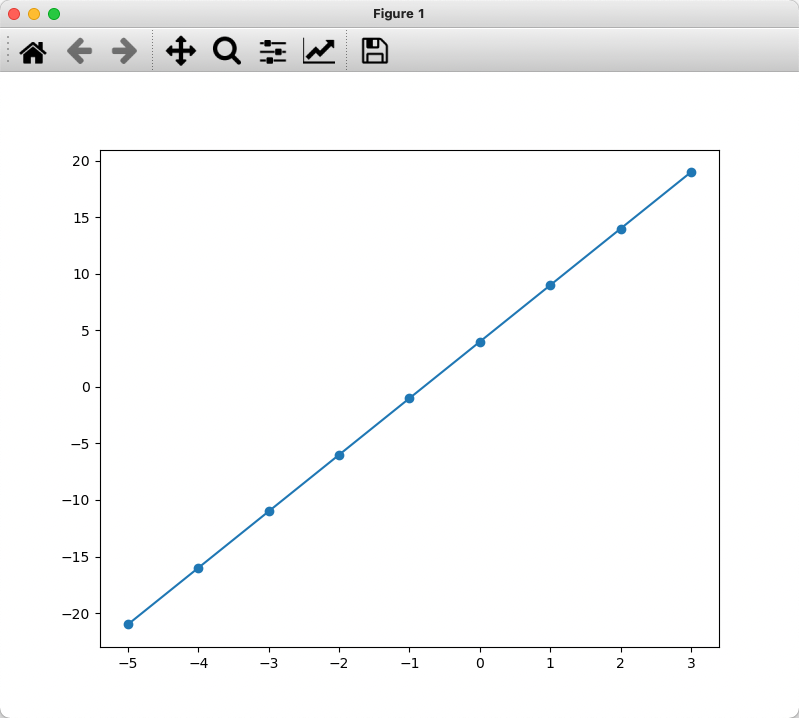
First Plot: Result

fig, axs = plt.subplots(1, 1)
lns = axs.plot(x, y)
  • fig, axs = plt.subplots(1, 1)
    • Creates a figure (fig)
    • Creates axes (axs)
  • lns = axs.plot(x, y)
    • Plots/creates a line object.
    • lns is a list of line objects; you can create more than one line object at a time.
    • There is only one line object in this example, so to access the object you need to use lns[0].

Plot Details

  • x and y are indeed discrete points (coordinates).
  • By default, invisible markers are put at these coordinates.
  • Matplotlib connects these markers with lines.
  • The result is a continuous-looking plot.
  • Markers can be set as visible characters with adjustable sizes.
  • Line type, color, and size can also be adjusted.

Part 2: Customizing Line Plots

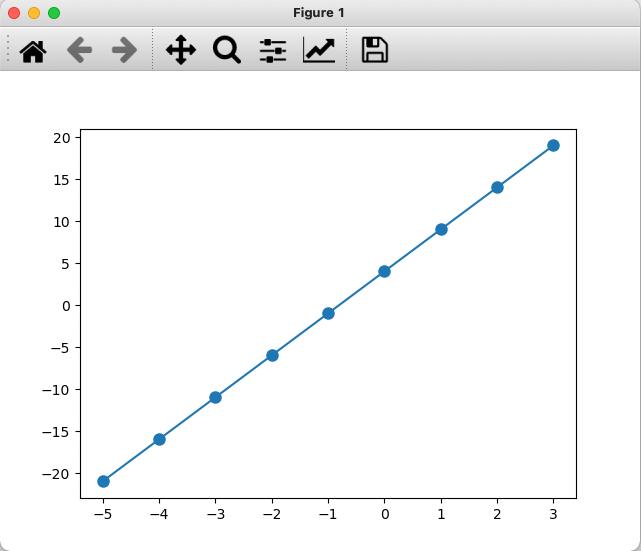
Plotting with a Specific Marker

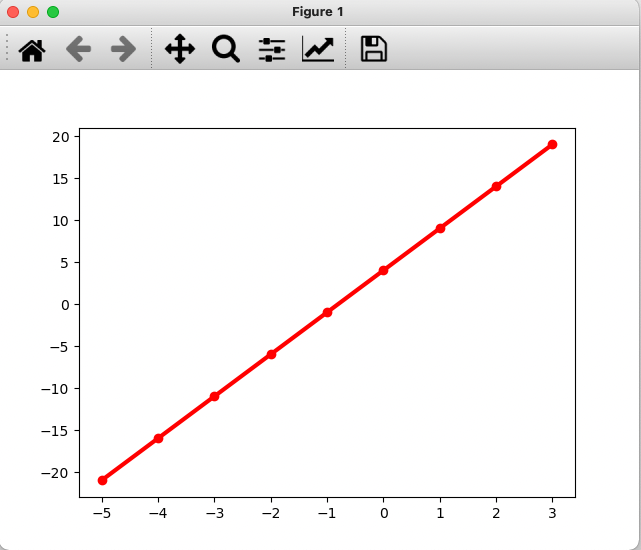
lns, = axs.plot(x, y, marker='o')

Markers

Symbol Marker
"." point
"," pixel
"o" circle
"v" triangle_down
"^" triangle_up
"<" triangle_left
">" triangle_right
"1" tri_down
"2" tri_up
"3" tri_left
"4" tri_right
"8" octagon
Symbol Marker
"s" square
"p" pentagon
"P" plus (filled)
"*" star
"h" hexagon1
"H" hexagon2
"+" plus
"x" x
"X" x (filled)
"D" diamond
"d" thin_diamond
"\|" vline
"_" hline

Marker Size

plt.plot(x, y, marker='o', markersize=8)

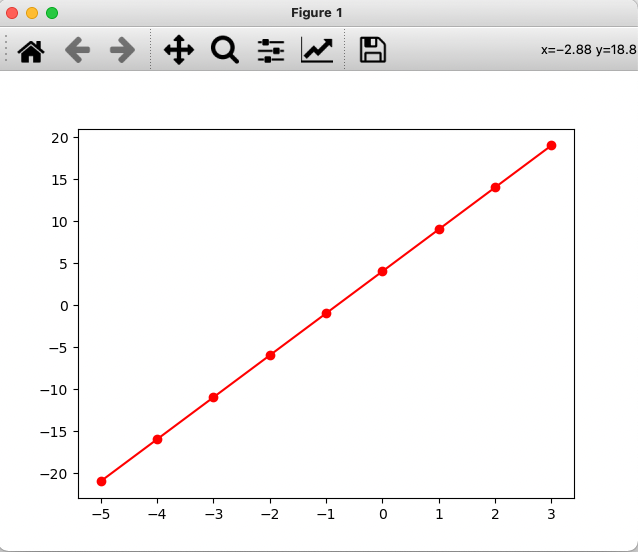
Line Color

lns, = axs.plot(x, y, marker='o', color='r')

Colors

Fast color names:

Code Color Code Color
'b' blue 'm' magenta
'g' green 'y' yellow
'r' red 'k' black
'c' cyan 'w' white

Line Width (lw)

lns, = axs.plot(x, y, marker='o', color='r', lw=3)

Line Style (ls)

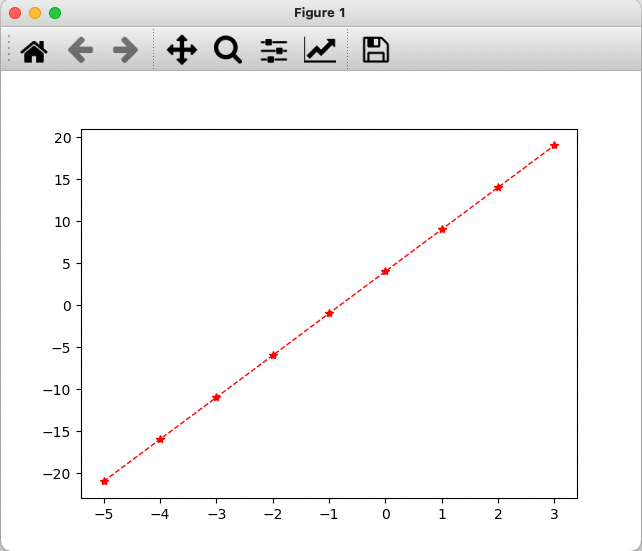
lns = axs.plot(x, y, marker='*', color='r', lw=1, ls='--')

Line Styles

Set with the linestyle (or ls) keyword:

Value Style
'-' solid
'--' dashed
':' dotted
'-.' dash-dotted

Part 3: Multiple Lines, Legends, and Labels

Adding a Second Plot: Code

import numpy as np
import matplotlib.pyplot as plt

# generate x array
x = np.arange(-5, 4, .1)

# calculate y and d
y = 5*x + 4
d = x**2 + 2*x - 3

# create figure and axes objects
fig, axs = plt.subplots(1, 1)
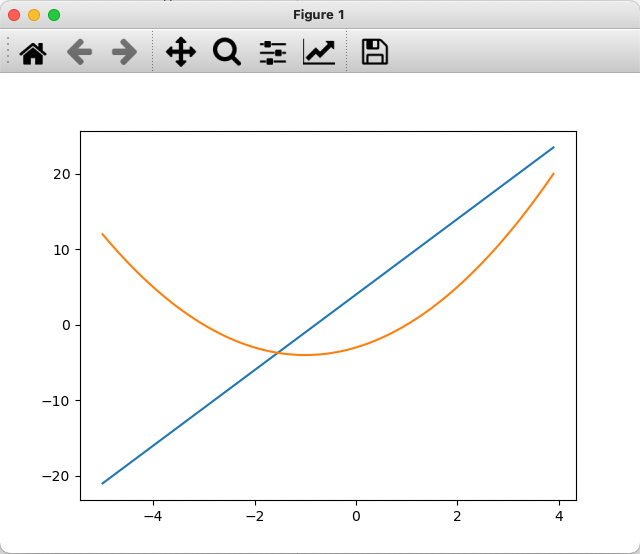
lns = axs.plot(x, y, x, d)  # lns is a list of two line objects

Adding a Second Plot: Result

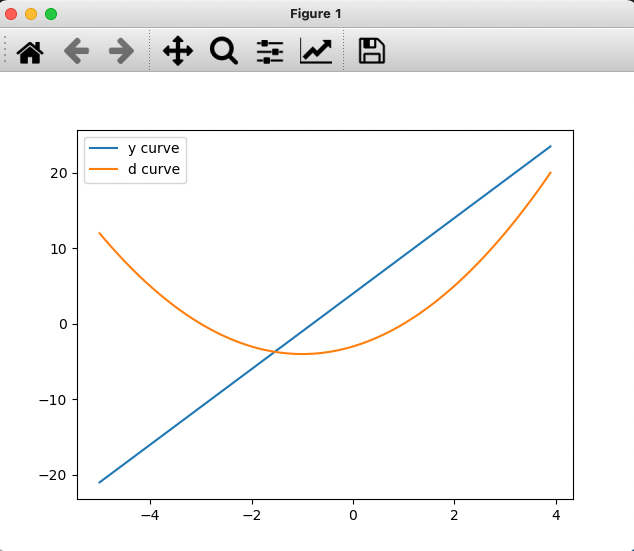
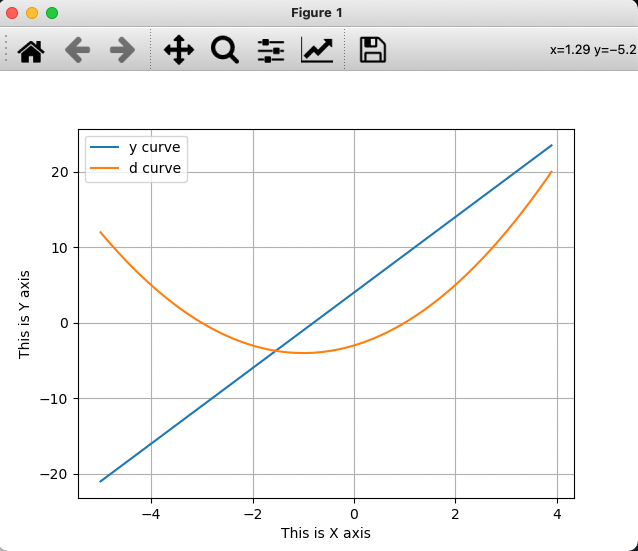
  • Colors are automatically assigned (if not specified).
Legend

  • Every plot in an axes pair should have a name.
  • This name is shown in the legend area.
  • legend is a function of the axes object.

Legend: Code

import numpy as np
import matplotlib.pyplot as plt

# generate x array
x = np.arange(-5, 4, .1)

# calculate y and d
y = 5*x + 4
d = x**2 + 2*x - 3

# create figure and axes objects
fig, ax = plt.subplots(1, 1)
line1, = ax.plot(x, y)
line2, = ax.plot(x, d)

# create legend
ax.legend([line1, line2], ['y curve', 'd curve'])

Legend: Result

Axes Labels

  • In a reliable plot, every axis should have a name and a unit.
  • In cartesian coordinates, axes are perpendicular.
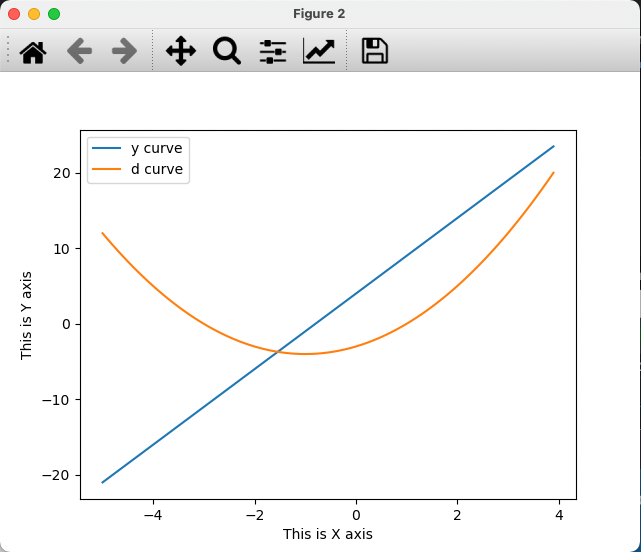
ax.set_xlabel('This is X axis')
ax.set_ylabel('This is Y axis')

Axes Labels: Code

import numpy as np
import matplotlib.pyplot as plt

# generate x array
x = np.arange(-5, 4, .1)

# calculate y and d
y = 5*x + 4
d = x**2 + 2*x - 3

# create figure and axes objects
fig, ax = plt.subplots(1, 1)
line1, = ax.plot(x, y)
line2, = ax.plot(x, d)

# create legend
ax.legend([line1, line2], ['y curve', 'd curve'])

# put axis labels
ax.set_xlabel('This is X axis')
ax.set_ylabel('This is Y axis')

Axes Labels: Result

Grids

  • For an easier visual follow of plot values on a graph, grids are also desired.
  • To put a grid, call the grid() function with a True bool:
ax.grid(True)
  • Without any input, it will toggle grid lines (turn them on if presently off and vice versa).

Grids: Result

Axis Limits

  • Axis limits are automatically set,
  • but can be manually assigned:
ax.set_xlim(left, right)
ax.set_ylim(bottom, top)
ax.axis([xmin, xmax, ymin, ymax])

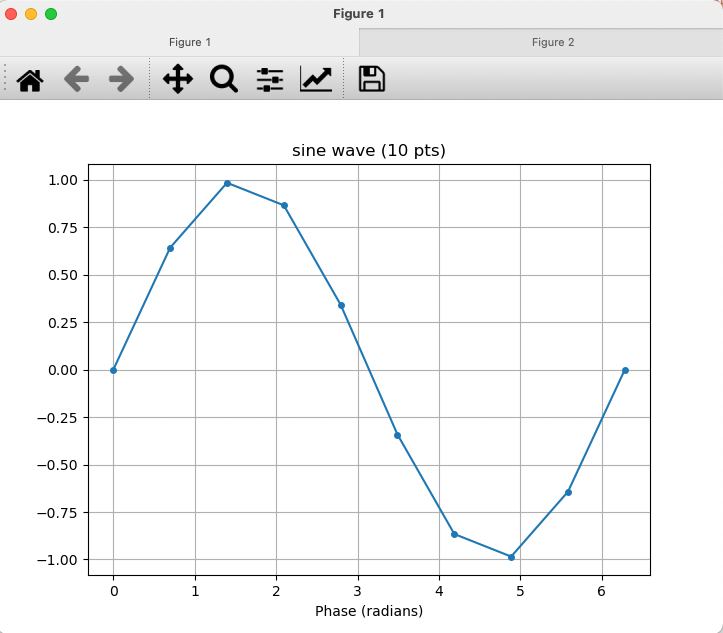
Example: Trigonometric Plots

Sample the sine function with np.linspace, once coarsely and once densely:

import numpy as np
import matplotlib.pyplot as plt

x10 = np.linspace(0, 2*np.pi, 10)
y_10pts = np.sin(x10)

x50 = np.linspace(0, 2*np.pi, 50)
y_50pts = np.sin(x50)

fig, ax = plt.subplots(1, 1)
line1, = ax.plot(x10, y_10pts, marker='.', markersize=8, ls='-')
ax.set_title('sine wave (10 pts)')
ax.set_xlabel('Phase (radians)')
ax.grid(True)

fig2, ax2 = plt.subplots(1, 1)
line2, = ax2.plot(x50, y_50pts, marker='.', markersize=8, ls='-')
ax2.set_title('sine wave (50 pts)')
ax2.set_xlabel('Phase (radians)')
ax2.grid(True)

Related functions: np.sin(x), np.cos(x), np.tan(x)

Continuous vs Discrete Plot

10 points: the sine wave looks angular - the sampling is too coarse.

Continuous vs Discrete Plot (2)
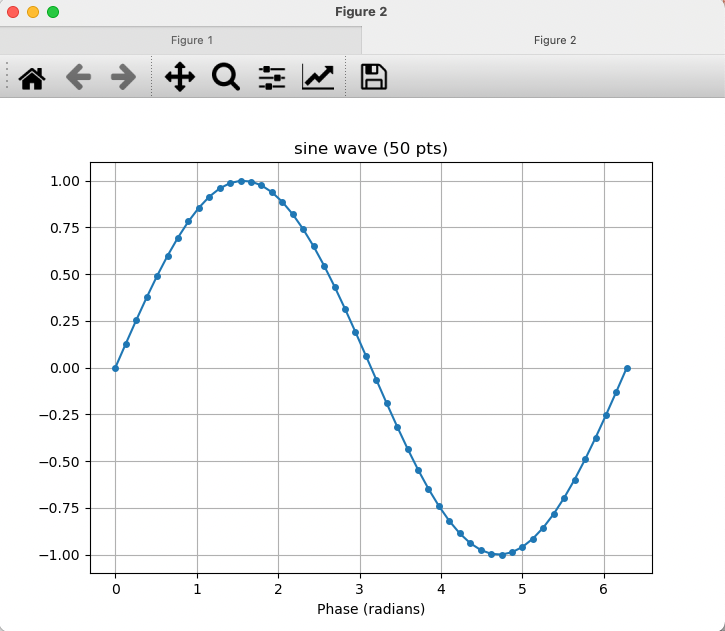
50 points: the same curve now looks smooth and continuous.

Part 4: Logarithmic Plots and Subplots

Logarithmic Plots

Any of the axes can be adjusted to logarithmic scale:

Function X axis Y axis
plot() linear linear
loglog() log log
semilogx() log linear
semilogy() linear log

Example: Filter Output

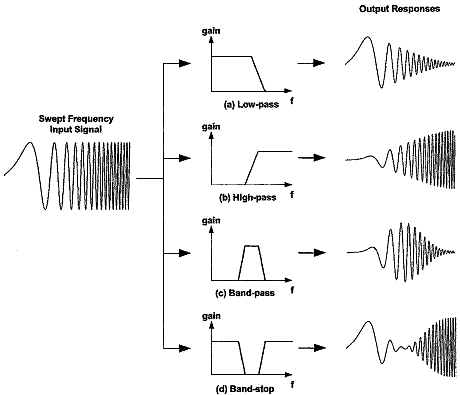
  • In signal processing, a filter is a device or process that removes some unwanted components or features from a signal.
  • Below you can see different frequency responses of different filters.
plot: Linear X and Y Scales

import numpy as np
import matplotlib.pyplot as plt

w = np.linspace(10, 100000, 1000000)
s1 = 1e12*w/(np.sqrt((1e8-w**2)**4 + (1e8*w)**2))
s2 = 1e12*w/(np.sqrt((1e6-w**2)**4 + (1e6*w)**2))

fig, ax = plt.subplots(1, 1)
ax.plot(w, s1)
ax.plot(w, s2)
ax.legend(['filter1', 'filter2'])
ax.set_title('Frequency Response (plot)')
ax.set_xlabel('frequency (linear scale)')
ax.set_ylabel('output (linear scale)')
ax.grid(True)
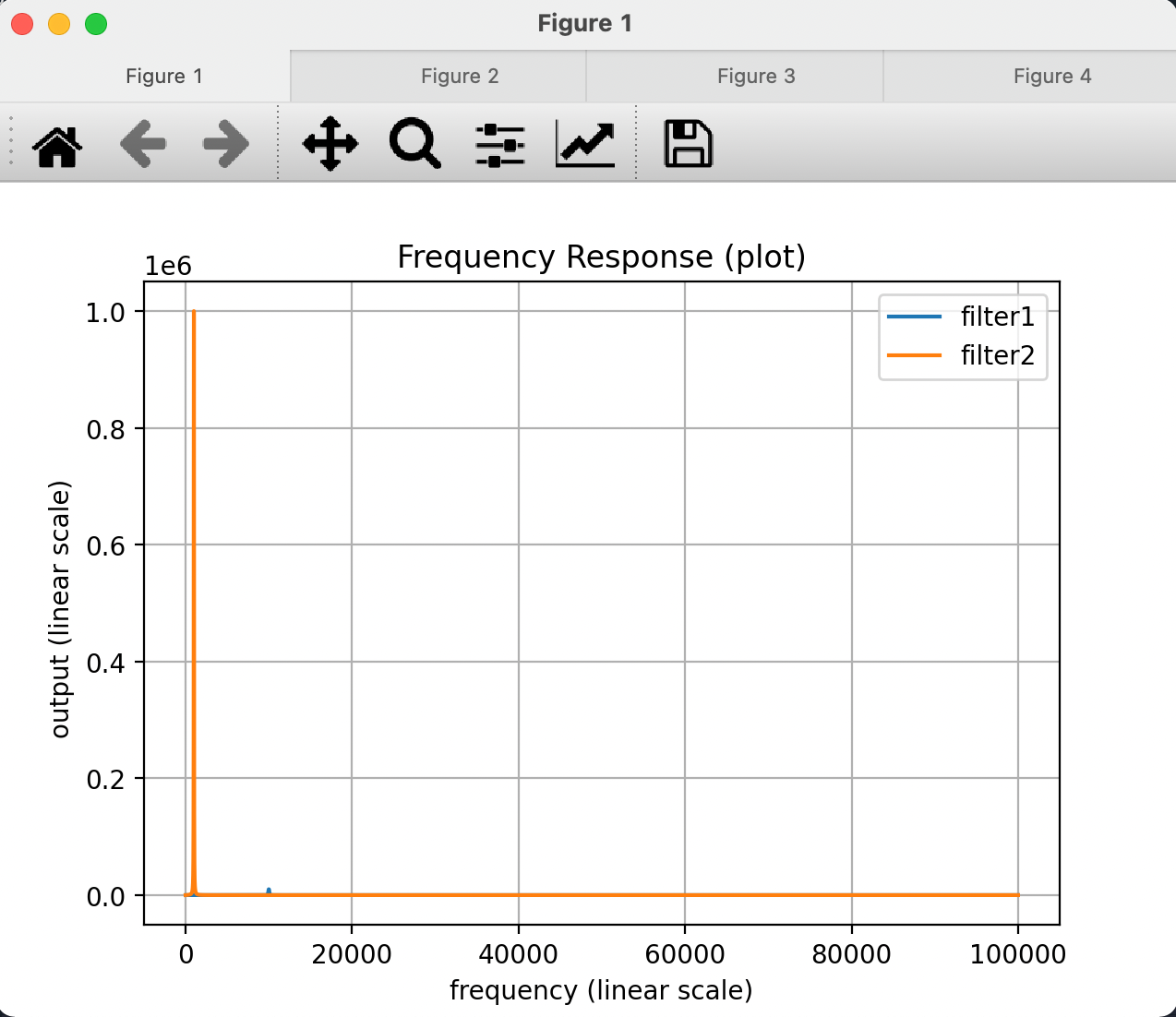
Signals’ evolution in x and y scales is not clear.

semilogx: Logarithmic X, Linear Y
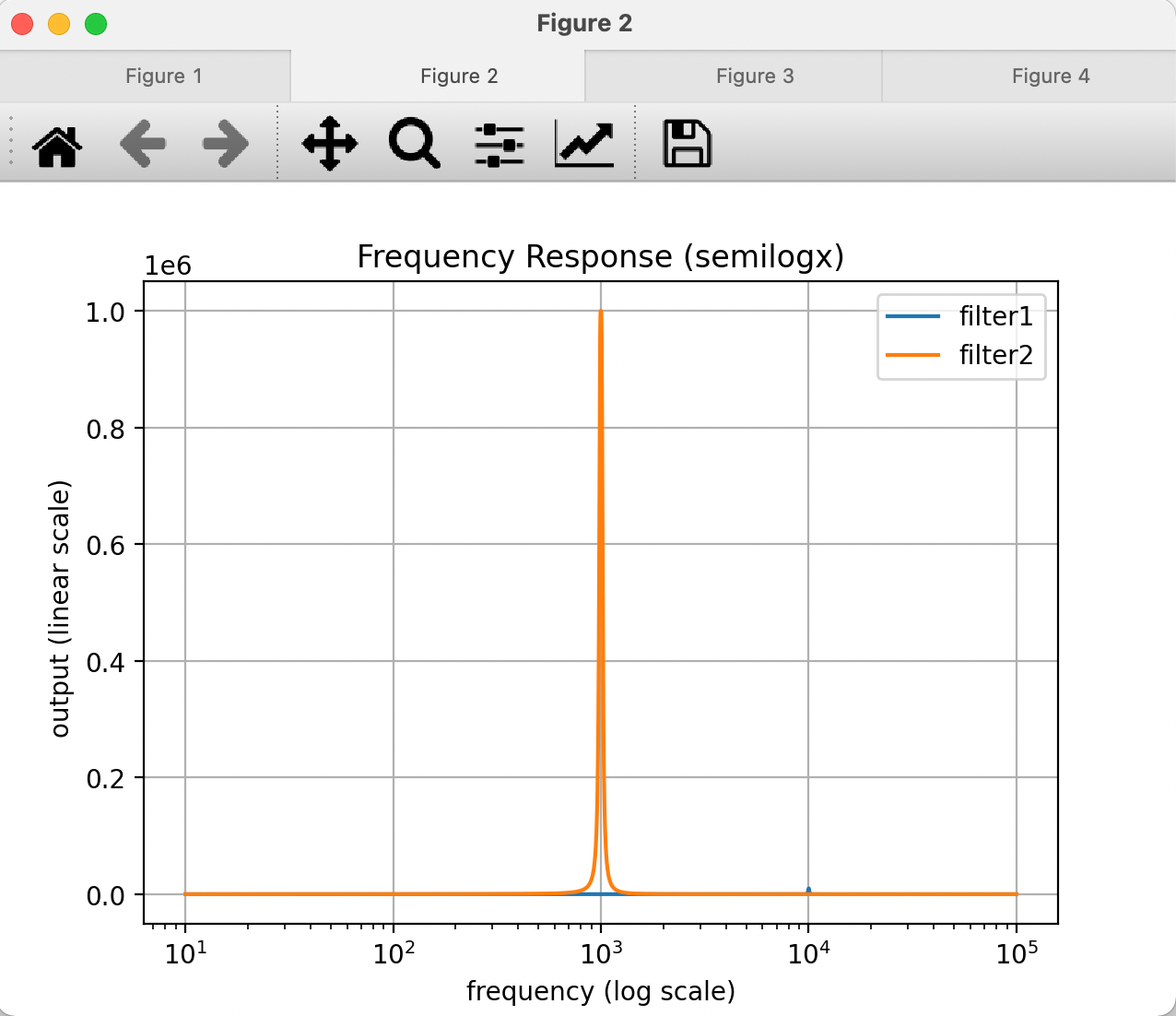
fig, ax = plt.subplots(1, 1)
ax.semilogx(w, s1)
ax.semilogx(w, s2)
ax.legend(['filter1', 'filter2'])
ax.set_title('Frequency Response (semilogx)')
ax.set_xlabel('frequency (log scale)')
ax.set_ylabel('output (linear scale)')
ax.grid(True)

Better in terms of x-axis position of the signals.

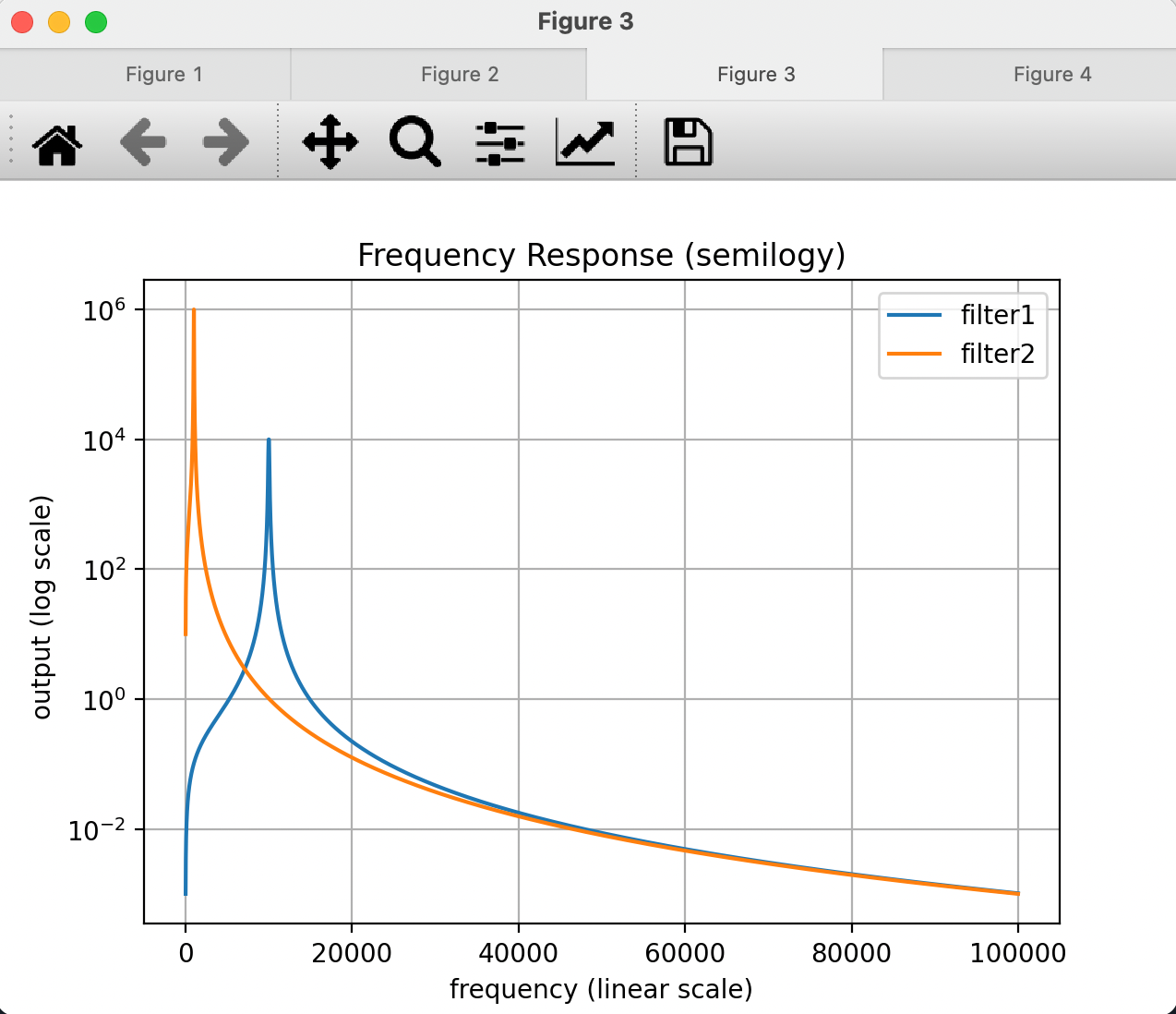
semilogy: Linear X, Logarithmic Y

fig, ax = plt.subplots(1, 1)
ax.semilogy(w, s1)
ax.semilogy(w, s2)
ax.legend(['filter1', 'filter2'])
ax.set_title('Frequency Response (semilogy)')
ax.set_xlabel('frequency (linear scale)')
ax.set_ylabel('output (log scale)')
ax.grid(True)

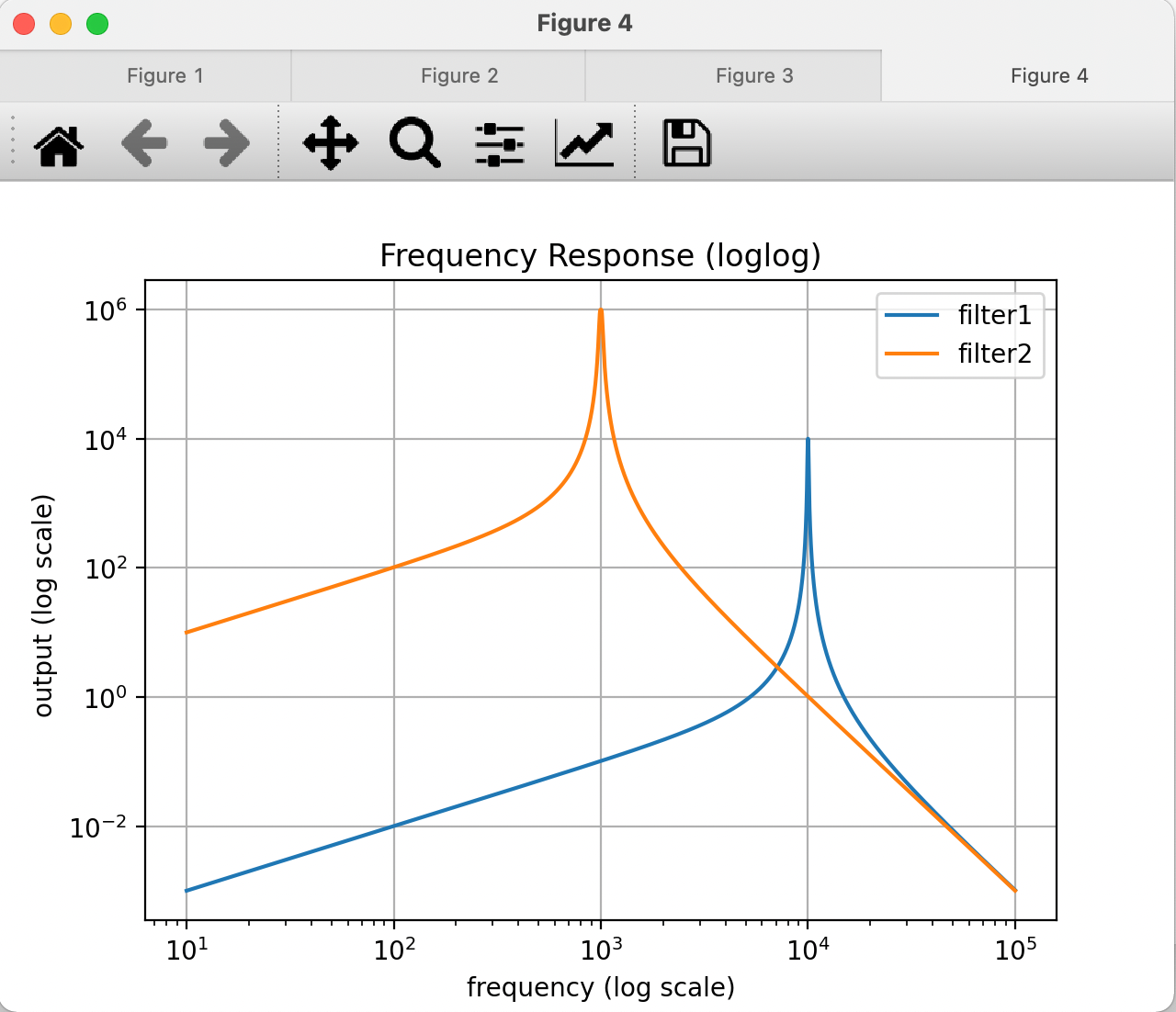
loglog: Both Axes in Log Scale

fig, ax = plt.subplots(1, 1)
ax.loglog(w, s1)
ax.loglog(w, s2)
ax.legend(['filter1', 'filter2'])
ax.set_title('Frequency Response (loglog)')
ax.set_xlabel('frequency (log scale)')
ax.set_ylabel('output (log scale)')
ax.grid(True)

A better view, as both x and y axis data have large ranges.

Subplots

Call the subplot function with more than one axes:

fig, ax = plt.subplots(1, 1)   # 1 row, 1 column

fig, axs = plt.subplots(2, 1)  # 2 rows, 1 column
axs[0].plot(x, y)
axs[1].plot(x, d)

Subplots: 2 x 2 Grid

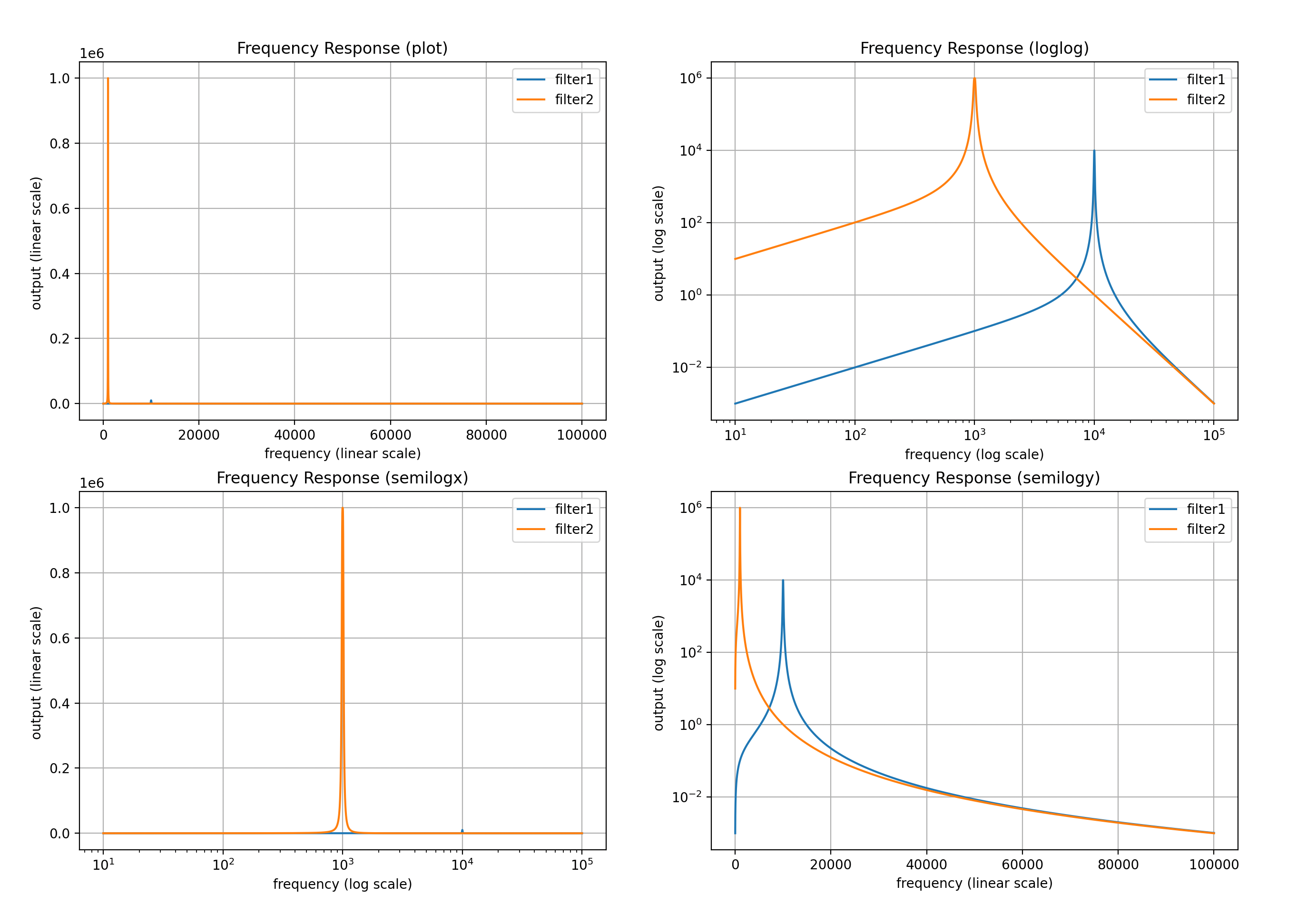
With fig, ax = plt.subplots(2, 2), the axes are indexed as ax[0,0], ax[0,1], ax[1,0], ax[1,1]:
Subplots: 2 x 2 Grid - Code

All four filter-response views in one figure:

fig, ax = plt.subplots(2, 2)

ax[0,0].plot(w, s1)
ax[0,0].plot(w, s2)
ax[0,0].legend(['filter1', 'filter2'])
ax[0,0].set_title('Frequency Response (plot)')
ax[0,0].set_xlabel('frequency (linear scale)')
ax[0,0].set_ylabel('output (linear scale)')
ax[0,0].grid(True)

ax[0,1].loglog(w, s1)
ax[0,1].loglog(w, s2)
ax[0,1].legend(['filter1', 'filter2'])
ax[0,1].set_title('Frequency Response (loglog)')
ax[0,1].set_xlabel('frequency (log scale)')
ax[0,1].set_ylabel('output (log scale)')
ax[0,1].grid(True)

ax[1,0].semilogx(w, s1)
ax[1,0].semilogx(w, s2)
ax[1,0].legend(['filter1', 'filter2'])
ax[1,0].set_title('Frequency Response (semilogx)')
ax[1,0].set_xlabel('frequency (log scale)')
ax[1,0].set_ylabel('output (linear scale)')
ax[1,0].grid(True)

ax[1,1].semilogy(w, s1)
ax[1,1].semilogy(w, s2)
ax[1,1].legend(['filter1', 'filter2'])
ax[1,1].set_title('Frequency Response (semilogy)')
ax[1,1].set_xlabel('frequency (linear scale)')
ax[1,1].set_ylabel('output (log scale)')
ax[1,1].grid(True)

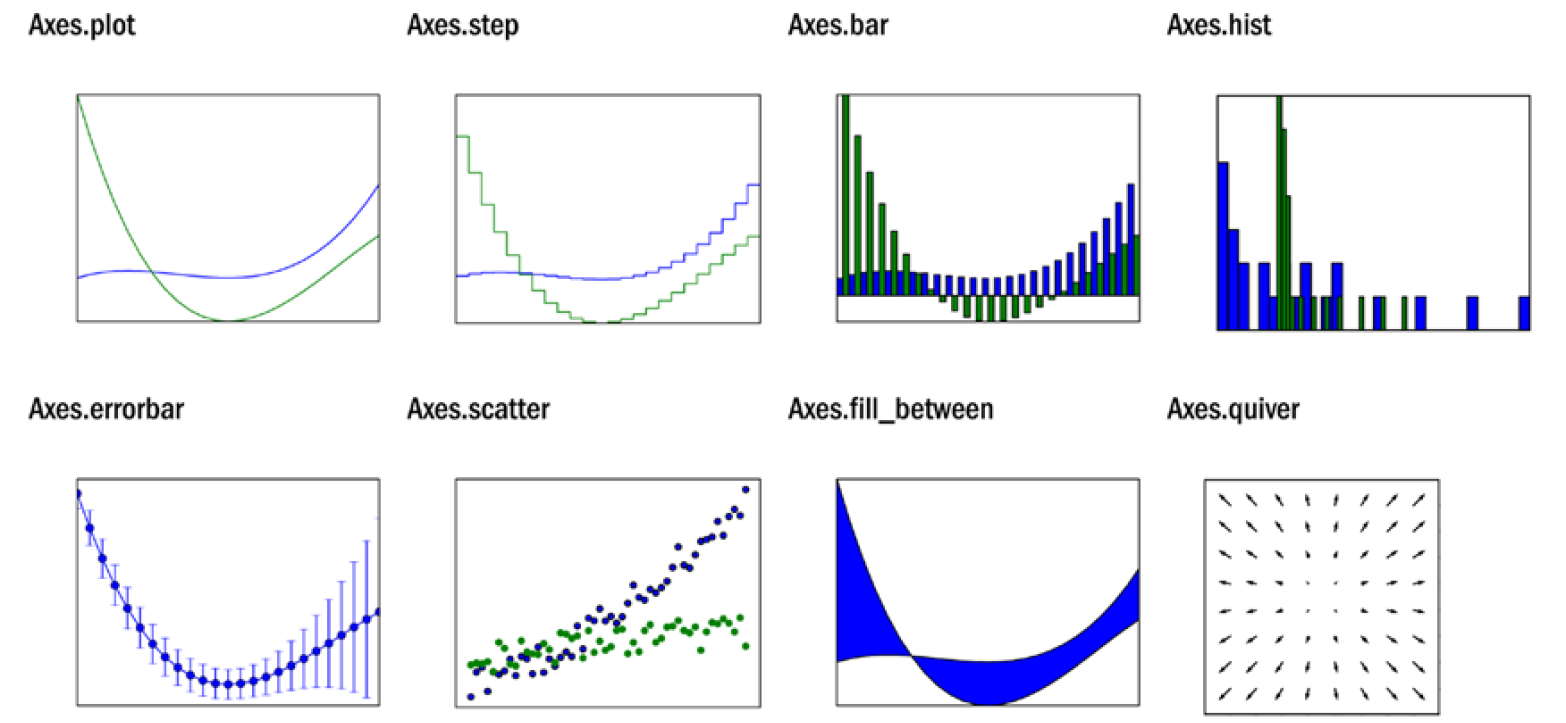
Other 2D Graph Types

Part 5: Complex Numbers and Polar Plots

Complex Numbers

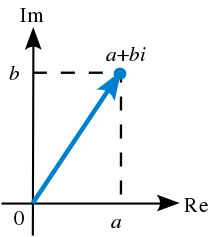
  • For real numbers \(a\) and \(b\), any complex number \(a + bj\) is located on the Euclidean plane \(\mathbb{R}^2\) with coordinate pair \((a, b)\).
  • This plane is called the Complex Plane.
    • X-axis = Real component
    • Y-axis = Imaginary component

Norm and Phase

  • The distance from the origin (on the complex plane) is the NORM.
  • The rotation angle from the real axis is the PHASE.

Polar Representation

  • Any complex number on the complex plane has:
    • A distance from origin (called NORM)
    • A rotation angle from the real axis (called PHASE)
  • These two parameters are very important in complex numbers.
  • Any complex number can be represented by its norm and phase.
  • This representation can be mapped to the same point using polar coordinates: in polar coordinates, norm and phase constitute the coordinate pair.

Complex Numbers and Python

>>> a = 3 + 4j
>>> b = 5 + 12j
>>> abs(a)
5.0
>>> abs(b)
13.0
>>> a*b
(-33+56j)
>>> a/b
(0.37278106508875736-0.09467455621301774j)
>>> a+b
(8+16j)
>>> a-b
(-2-8j)
>>> import numpy as np
>>> np.angle(a)
0.9272952180016122
>>> np.rad2deg(np.angle(a))
53.13010235415598
>>> a.real
3.0
>>> a.imag
4.0
  • abs() gives the norm, np.angle() gives the phase.

Polar Plot

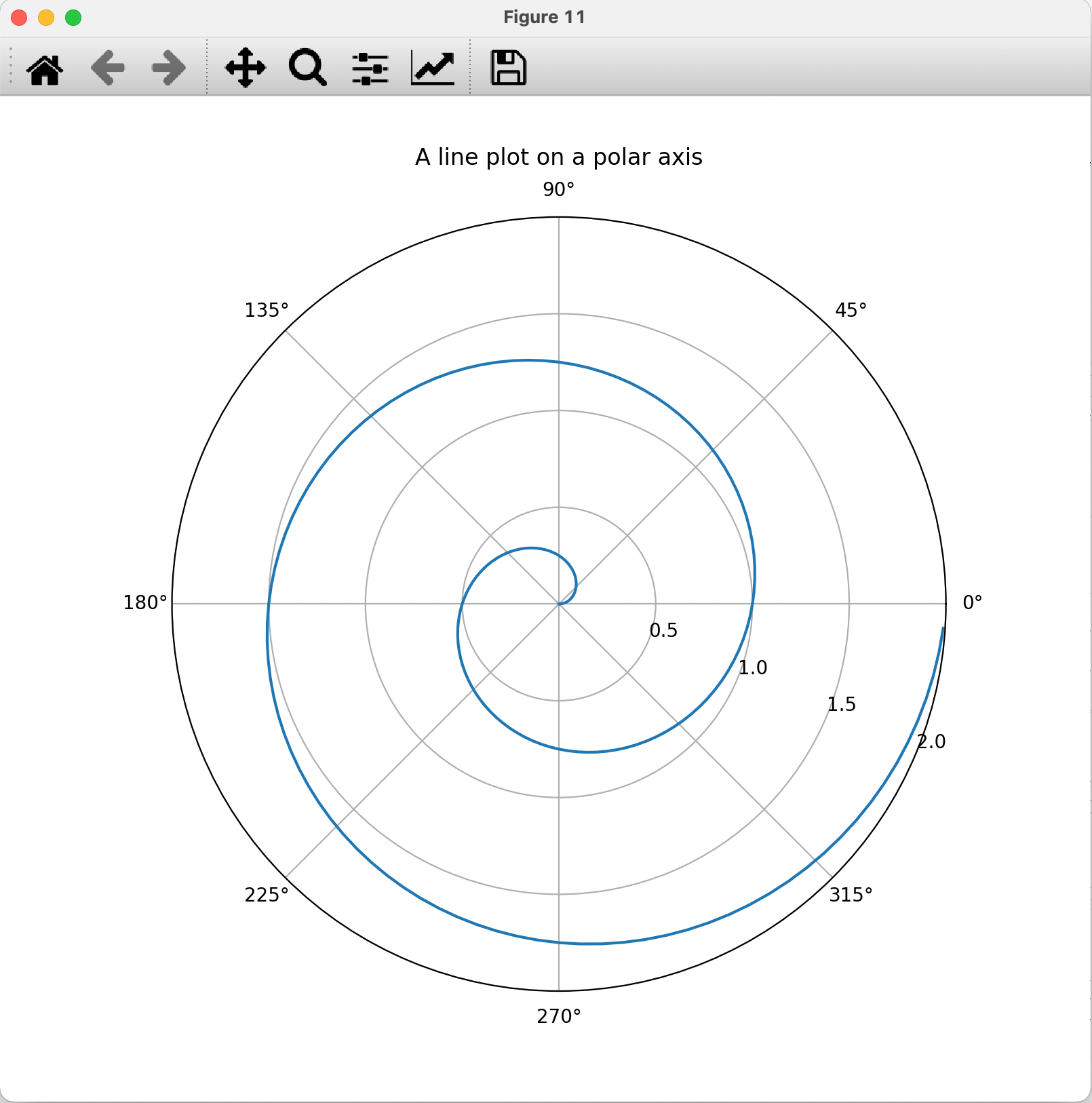
import numpy as np
import matplotlib.pyplot as plt

r = np.arange(0, 2, 0.01)
theta = 2 * np.pi * r

fig, ax = plt.subplots(subplot_kw={'projection': 'polar'})
ax.plot(theta, r)
ax.set_rmax(2)
ax.set_rticks([0.5, 1, 1.5, 2])  # fewer radial ticks
ax.set_rlabel_position(-22.5)    # move radial labels
ax.grid(True)

ax.set_title("A line plot on a polar axis", va='bottom')
plt.show()
Summary

  • A matplotlib graphic is built from figure, axes, and line objects: fig, ax = plt.subplots() then ax.plot(x, y).
  • Markers, colors, line widths, and line styles are set with keyword arguments of plot().
  • Readable plots need titles, axis labels, legends, grids, and sensible axis limits.
  • semilogx, semilogy, and loglog reveal behavior that linear scales hide.
  • plt.subplots(rows, cols) places several axes in one figure.
  • Complex numbers have a norm and a phase and map naturally onto polar plots.

Reference